Someone asks what a custom WordPress plugin costs, and the honest answer sounds evasive. It depends. It depends so heavily that a number given before anyone has read the requirement is closer to a guess than a quote.
That is not a satisfying thing to hear when you have a budget meeting on Thursday.
So this post does the opposite of evasive. It gives real bands, explains exactly which variables move you between them, lists the costs that get left out of most quotes, and shows you how to write a brief specific enough that three different developers quote within range of each other. If you read nothing else, read the first two sections. They contain the numbers.
One thing to establish up front: every band below is drawn from published market rate guides and cross-checked against several of them. Where those sources disagree, and they do disagree in places, this post says so instead of picking whichever number sounds best. Anyone quoting you a single confident figure for a category this broad is not being more precise than the market. They are being less careful.
The short answer: four price bands
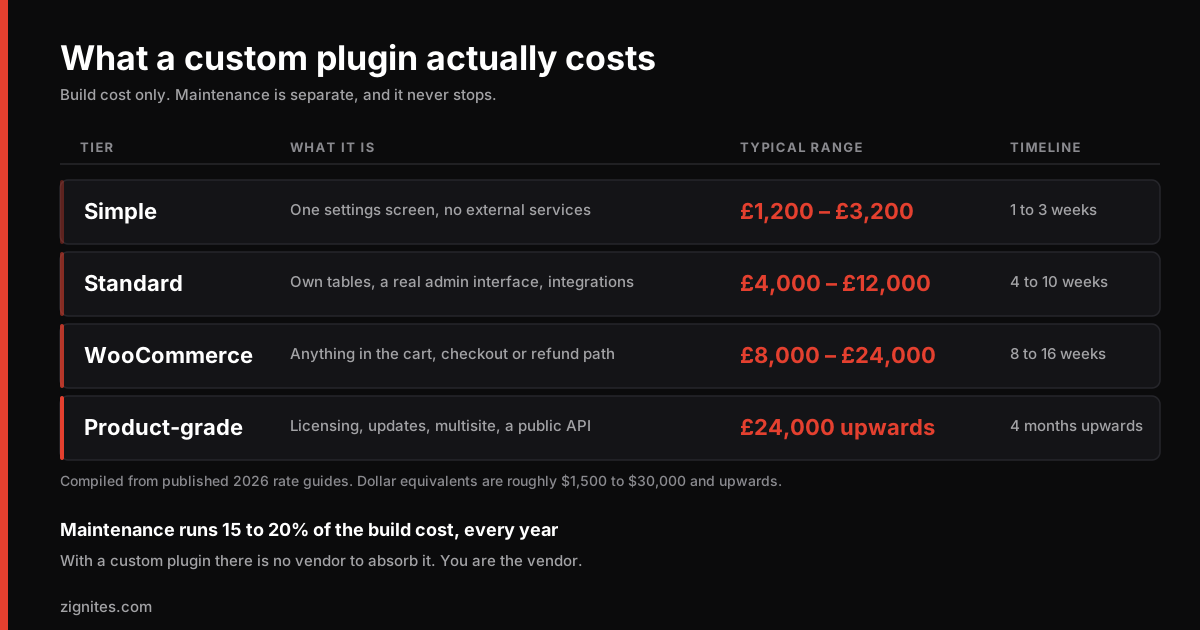
Across published 2026 rate guides, custom WordPress plugin work clusters into four tiers. These are build costs. Maintenance is separate and comes later in this post.
Tier | What it is | Typical range | Typical timeline |
|---|---|---|---|
Simple | Single-purpose plugin, one settings screen, no external services. A shortcode, a custom widget, a small admin utility. | £1,200 to £3,200 (roughly $1,500 to $4,000) | 1 to 3 weeks |
Standard | Custom post types, a proper admin interface, database tables of its own, a few integration points. | £4,000 to £12,000 (roughly $5,000 to $15,000) | 4 to 10 weeks |
WooCommerce | Anything that sits in the checkout, cart, tax, shipping or refund path. Payment-adjacent work carries its own testing burden. | £8,000 to £24,000 (roughly $10,000 to $30,000) | 8 to 16 weeks |
Product-grade | Licensing, an update server, multi-site support, a documented public API, tiered features, a support process. | £24,000 upwards | 4 months upwards |
Currency conversions are approximate and move. Treat the dollar figures as the source data, because most published rate guides are American.
A few things worth noticing about that table before you scroll past it.
The gap between the top of Simple and the bottom of Standard is not gradual. It is a step. The moment a plugin needs its own database tables and a real admin interface, you have crossed from scripting into software, and the work changes character. Most projects that blow their budget do so because they were scoped as Simple and turned out to be Standard once someone read the requirement properly.
The WooCommerce band is higher than the Standard band for a reason that has nothing to do with WooCommerce being harder to code. It is higher because money moves through it. A bug in a settings screen is an annoyance. A bug in a tax calculation is a legal problem, and the testing required to be confident there is a genuine, billable share of the project.
Why the range is so wide, and what actually moves you within it
Six variables account for most of the spread. If you can answer these six questions, you can place your own project in the table above with reasonable accuracy before you speak to anyone.
How much of WordPress does the plugin have to touch? A plugin that lives behind its own settings screen and does one clear job is a contained piece of work. A plugin that hooks into the checkout, filters queries across the whole site, or modifies how other plugins behave has a surface area that grows with every additional touchpoint. Surface area is the single biggest driver of both build cost and future maintenance.
Is there an external system involved? This is the variable that most often turns a two-week job into a two-month one. When a plugin has to talk to a CRM, an ERP, a payment provider or a warehouse system, the cost is governed by the quality of the other system's API, not by your requirement. A well-documented REST API with sandbox credentials is a pleasant few days. An undocumented SOAP endpoint belonging to a vendor who answers support tickets in a fortnight is a project risk that no honest developer will quote blind. We scope integrations after reading the documentation, never before, and you should be suspicious of anyone who does not.
Does it need its own data? Storing settings in the options table is trivial. Creating custom tables with proper indexes, migration handling and an upgrade path across plugin versions is a different discipline. If the plugin has to store records that grow, think orders, submissions, logs, events, you are in Standard territory at minimum.
Who else will use the admin interface? A plugin used only by you can have a rough interface. A plugin used by a client's staff needs to be self-explanatory, forgiving of mistakes, and it needs the states nobody thinks to ask for: what it looks like when the list is empty, when the API is down, when someone pastes the wrong key. Building those states properly is often a quarter of the front-end effort and is almost never in the original brief.
How many WordPress versions, PHP versions and other plugins does it need to survive? Compatibility is a testing cost, and testing costs scale with the matrix. Supporting the current WordPress release on current PHP is cheap. Supporting three PHP versions, two WordPress versions, and coexisting peacefully with a page builder and a caching plugin is a much larger commitment.
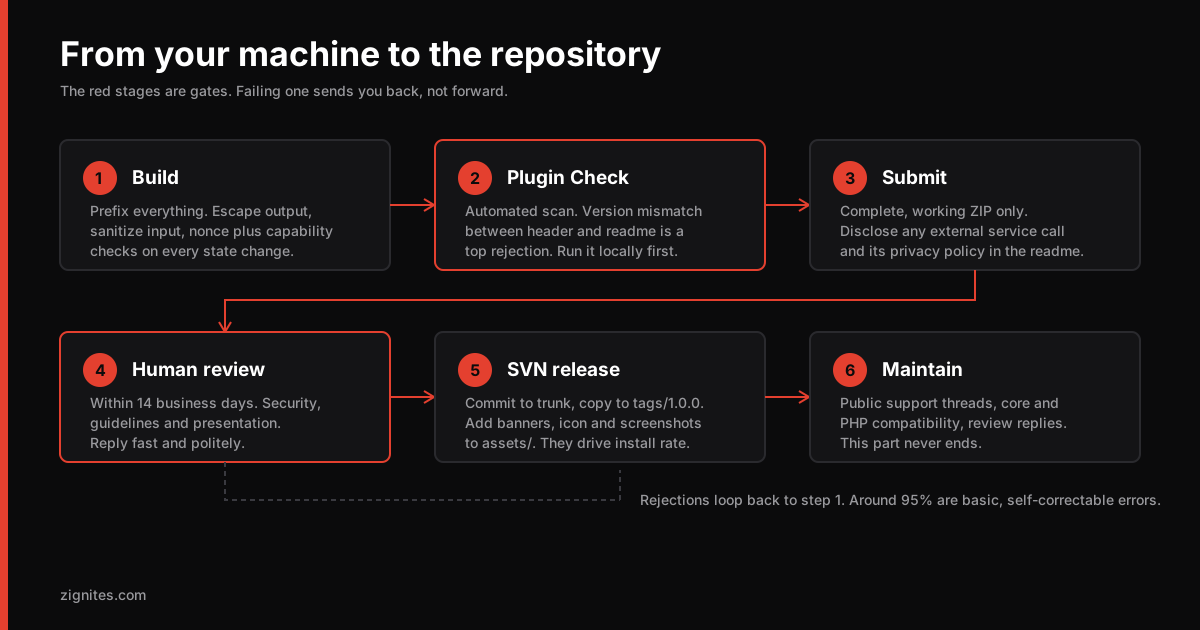
Is it going on WordPress.org? Public distribution adds real work. The directory now holds 66,302 plugins, and everything in it passed a human review against a published guideline set. Meeting that standard means sanitising every input, escaping every output, checking capabilities and nonces on every action, writing a proper readme.txt, and clearing the automated Plugin Check tool. If you have not been through it, our full walkthrough of the WordPress.org review process sets out what reviewers actually look for. Budget an extra one to two weeks, and expect at least one round of revisions.
Hourly rates in 2026, and why the published ranges contradict each other
Plenty of plugin work is quoted hourly, particularly smaller pieces and ongoing changes. Here is where the market sat in 2026, compiled from several published rate guides.
Who | Typical hourly rate |
|---|---|
Entry-level freelancer, 0 to 2 years | $35 to $60 |
Mid-level freelancer, 2 to 5 years | $60 to $100 |
Senior freelancer, 5 years and up | $100 to $175 |
Agency | $75 to $200 and above |
Offshore developers, Eastern Europe and South Asia | $20 to $60 |
Now the caveat that most articles skip. These sources do not agree with each other. One widely cited guide puts the entire freelance range at $15 to $75 per hour. Another, cited just as often, puts senior freelancers alone at $100 to $175. Those two claims cannot both describe the same market, and the reason they differ is that "freelance WordPress developer" spans someone installing themes and someone architecting a multi-tenant platform. The title is doing no work.
What that means practically: an hourly rate tells you almost nothing on its own. A $40 developer who needs sixty hours costs more than a $110 developer who needs twenty, and the $110 version is usually the one that still works after the next WordPress release. Judge the total, and judge the code.
The agency premium is real and it is not margin. An agency rate covers project management, quality assurance, a code review process, and continuity when one person is unavailable. Whether that is worth two to three times a freelance rate depends entirely on what happens if your plugin breaks while the person who wrote it is on holiday. For a marketing microsite, probably not. For something in your checkout, almost certainly.
Fixed price or hourly: which one actually protects you
Most people assume fixed price is the safe option because the number cannot move. That is half true and worth unpacking, because choosing wrongly here costs more than choosing the wrong developer.
Fixed price works when the scope is genuinely knowable in advance. A plugin with a written specification, a defined set of screens, and no dependency on a third-party system you have not tested can be quoted fixed with confidence. You get budget certainty. The developer carries the estimation risk, and prices it in, so you will pay a premium of maybe fifteen to thirty percent over what the hours would have cost. That premium is insurance and it is usually worth it.
Fixed price fails badly when the scope is not knowable. If the requirement contains the words "integrate with", and nobody has read the other system's documentation yet, a fixed price is a fiction. One of two things happens. Either the developer pads heavily to cover the unknown, and you overpay for a job that turned out to be simple, or they quote optimistically, discover the reality in week three, and you spend the rest of the project in an argument about what was in scope. Neither outcome is good and both are avoidable.
The workable middle is a paid discovery phase. Pay for a short, fixed-price piece of work whose only deliverable is a specification: the other system's API assessed, the edge cases listed, the screens sketched, the risks named. It typically costs a few percent of the project. At the end you have a document you own, which you can take to three developers and get three comparable fixed quotes on. The discovery fee pays for itself the first time it stops you commissioning the wrong thing.
Be direct about one thing here. A developer who is willing to quote a firm fixed price for an integration they have not investigated is telling you something about how they work. It is not a green flag.
The costs that do not appear in the quote
This is the section that changes budgets, so it is worth reading slowly. Every item below is a genuine cost of owning a custom plugin, and most quotes cover none of them.
Your own time. Someone at your end has to answer questions, review builds, supply credentials, chase the third party whose API you are integrating, and make decisions. On a Standard-tier project that is realistically twenty to forty hours of a manager's time. It is not billed to you, but it is not free either, and projects stall when nobody has been allocated to it.
Test environments and third-party services. Staging hosting, a sandbox account with the payment provider, a test instance of the CRM, sometimes a paid API tier just to develop against. Small individually, and they add up.
Content and configuration. The plugin arrives empty. Someone has to populate it, configure it, and check it behaves against real data rather than the twelve sample records used in development. This is routinely underestimated by a factor of about three.
Training and documentation. If staff will use it, they need to be shown how, and they need something to refer to in six months when the person who was trained has left.
The first month after launch. Something always surfaces once real users touch it. Not necessarily a defect, often a workflow assumption that turned out to be wrong. Reserve ten percent of the build budget for the four weeks after go-live and you will almost never regret it.
Security review, if the plugin handles anything sensitive. If it processes payments, stores personal data, or exposes an endpoint, an independent look at it is a proportionate expense. The OWASP API security categories are a reasonable starting checklist for what that review should cover.
Where the money actually goes inside a plugin build
People assume they are buying code. They are buying roughly forty percent code and sixty percent everything else, and understanding that split is the fastest way to see why two quotes can differ so widely.
A rough breakdown for a Standard-tier project:
Activity | Share of budget | What it covers |
|---|---|---|
Discovery and specification | 10 to 15% | Requirements, API assessment, edge cases, screen design |
Core development | 35 to 45% | The actual plugin logic, data layer, hooks |
Admin interface | 15 to 20% | Screens, forms, validation, empty and error states |
Testing and compatibility | 15 to 20% | Version matrix, other plugins, realistic data volumes |
Documentation and handover | 5 to 10% | Developer docs, user guidance, deployment |
Two observations that follow directly from that table.
The interface costs more than people expect and is the first thing cut. When a budget is tight, the admin screens get simplified, because the plugin still works without polish. It does work. It also generates support requests forever, because the person using it cannot tell what went wrong when something goes wrong. If you are going to economise somewhere, economise on scope rather than on the states that tell users what is happening.
Testing is not padding. Fifteen to twenty percent on testing sounds generous until you consider what it covers: several PHP versions, at least two WordPress versions, coexistence with whatever else is installed, and behaviour at data volumes nobody has in development. A quote with no testing line is not a cheaper quote. It is the same quote with the testing moved into your production environment, where you will pay for it in incidents rather than in hours.
There is a version of this you can use as a negotiating tool. If a quote comes in above budget, ask for the breakdown by these five activities. The conversation then becomes "which of these are we reducing, and what do we accept as a result", which is a decision you can make sensibly. Asking for "ten percent off" is a conversation about margin, and it usually gets taken out of testing.
Regional rates, and what you gain and lose
Offshore rates in Eastern Europe and South Asia run roughly $20 to $60 an hour against $75 to $200 and above for agencies in the US and Western Europe. That gap is large enough that it deserves an honest treatment rather than either the "you get what you pay for" dismissal or the "identical quality, third of the price" sales pitch. Both are wrong.
What genuinely differs is cost of living, not capability. WordPress is an open ecosystem, the documentation is public, and the same core APIs are available to everyone. Some of the most widely installed plugins in the directory were built by teams in Eastern Europe and South Asia. Capability is distributed far more evenly than pricing is.
What can differ, and what to actually check for. Timezone overlap, and whether there is enough of it for the decision-making your project needs. Written communication, because most project failure is a briefing failure rather than a coding one, and a brief misread in week one is expensive wherever the developer sits. Continuity, which is a question about the team rather than the country: what happens to your plugin if the individual who wrote it changes jobs. Contract enforceability and IP assignment, which is worth ten minutes with someone who knows the jurisdiction.
What does not vary at all is the standard the code has to meet. WordPress core does not care where a plugin was written, and neither does the review team at WordPress.org, which applies the same guideline set to every submission regardless of origin.
The practical way to use this: do not shop on rate. Ask for a link to code you can read. Ask what they maintain that is more than two years old, which is the question that separates people who ship from people who ship and then leave. A developer with published plugins has already had their work reviewed in public by people with no reason to be kind, and that is worth more than any rate comparison.
Maintenance: the fifteen to twenty percent almost nobody budgets
Published guidance clusters around 10 to 20 percent of the initial build cost per year, with 15 to 20 percent the most commonly cited band. On a £8,000 plugin that is £1,200 to £1,600 a year, indefinitely.
People resist this figure, and the resistance is understandable, because plugins feel finished in a way that websites do not. Here is why the number is real anyway.
WordPress moves underneath you. Core releases deprecate functions, change hook behaviour, and occasionally alter defaults. PHP moves too, and a version that was current when your plugin was written will eventually stop receiving security patches. Neither of these is anybody's fault. Both require someone to open the code and adjust it.
With a custom plugin, you are the vendor. This is the part that catches people out. When a commercial plugin breaks after a WordPress update, the vendor fixes it and you install the update. When your custom plugin breaks, there is no vendor. There is only a developer you now need to find, brief and pay, quite possibly a different developer from the one who wrote it, who will need time to understand the code before they can change a line of it.
Ignoring it does not save money, it defers it and adds interest. Skipped maintenance turns into a rewrite. The gap between "this needs three hours of updating" and "this needs rebuilding" is usually about two years of neglect, and the rebuild costs more than six years of maintenance would have.
What you can do to lower it. Keep the surface area small. Depend on stable core APIs rather than on other plugins' internals. Insist on tests for the parts that touch money. Insist on documentation good enough that a competent developer who has never seen the code can be productive in a day, and check that by having someone else read it before you sign off. Whether you retain the original developer or handle it in-house is genuinely optional, and plenty of teams take the handover and manage it themselves. That only works if the handover was built to be handed over.
Build or buy: the question worth asking before any of this
The cheapest custom plugin is the one you did not need. With 66,302 plugins in the directory and thousands more sold commercially, the odds that your requirement is genuinely unprecedented are lower than they feel.
Buy when an existing plugin does eighty percent of what you need and the remaining twenty percent is preference rather than requirement, or when the existing plugin has an extension API you can hook into. Commercial licences run tens to low hundreds of pounds a year against thousands for a build, and somebody else carries the compatibility burden forever. That holds only while the vendor keeps shipping releases, the signal our WordPress plugin maintenance checks read for popular plugins in the directory.
Build when any of the following is true. Your requirement is genuinely specific to how your business operates, which is more common in operations and fulfilment than in marketing. You have tried two or three existing plugins and each fails on the same core point. The existing options are individually fine but you need four of them, and four plugins is four times the update surface, four times the conflict risk and, quite often, four times the page weight. Or the data involved cannot leave your infrastructure, which rules out most hosted alternatives immediately.
A test that settles it quickly. Write down the requirement in one sentence, then search the directory for it, then install the three closest matches and use them properly for a week with your real data. Not a demo, real data. One of three things happens. One of them does the job, and you have saved several thousand pounds for the cost of an afternoon. All three fail in the same place, which is the most useful outcome of all, because that shared failure point is now the specification for your custom build and it is the paragraph that will make your brief good. Or they each fail differently, which usually means the requirement is not yet clear enough to build against, and you have learned that before paying anyone to discover it.
This is a week of somebody's time and it reliably pays for itself. The teams who skip it are the ones who commission a build and then find, in month two, that the thing they needed was a configuration option in a plugin they already had installed.
The honest middle ground: extend rather than replace. Writing a small companion plugin that hooks into a well-maintained commercial plugin is frequently the right answer and is quoted far too rarely. You get the vendor's maintenance on ninety percent of the surface and own only the part that is genuinely yours. It is usually a Simple-tier cost for a Standard-tier outcome.
Before commissioning anything, it is worth auditing what you already run. Our WordPress Plugin Risk Report checks an installed plugin set for abandoned and risky components, and it occasionally turns up the fact that a plugin you already own does the thing you were about to pay to have built.
What a realistic timeline looks like
Cost and timeline are linked, and compressing one inflates the other. Rough shape of a Standard-tier project:
Week 1, discovery and specification. Requirements written down properly, third-party APIs assessed, edge cases identified, screens agreed. Skipping this does not save a week. It moves the week to somewhere less convenient.
Weeks 2 to 6, build. Working software at the end of each week, not one big reveal at the end. If you are not seeing something you can click by the end of week two, ask why.
Weeks 7 and 8, testing and hardening. Compatibility across the supported matrix, security review, performance under realistic data volumes, and all the empty and error states.
Week 9, deployment and handover. Documentation, training, a migration plan if it replaces something.
Weeks 10 to 13, the settling period. Real users, real data, the adjustments that only surface once both exist.
If someone offers to do a Standard-tier plugin in two weeks, they are proposing to skip discovery and testing. That is occasionally the right trade for a genuine deadline. It should be a decision you make deliberately, with the cost understood, not a surprise you discover in month three.
How to write a brief that gets you accurate quotes
Quote variance is mostly a briefing problem. Three developers quoting £2,000, £9,000 and £22,000 for the same plugin are not disagreeing about their rates. They are quoting three different plugins, because the brief let them.
A brief that produces comparable quotes contains all of the following.
What the plugin must do, written as outcomes rather than features. "Warehouse staff scan a barcode and the order status updates" tells a developer far more than "barcode scanning functionality", because it exposes the workflow, the users and the integration point in one sentence.
What you have already tried, and precisely why it failed. This is the single most useful paragraph in any brief. It rules out the obvious suggestions, tells the developer where the real difficulty sits, and immediately signals that you have done your homework.
Every external system, named, with documentation links. Not "integrates with our CRM" but "integrates with HubSpot, using this API, and here are the fields we need to sync." If you cannot supply the documentation, say so, because that is itself a finding.
Who uses it and how technical they are. This determines the entire interface budget.
Your compatibility requirements. WordPress versions, PHP versions, multisite or not, other plugins it must coexist with, and whether it is going on WordPress.org.
Your actual budget range. People withhold this believing it gets them a better price. It mostly gets them proposals that miss, and it wastes a fortnight. Saying "we have eight to twelve thousand" lets a developer tell you honestly whether your requirement fits, and if it does not, which parts to drop.
What happens after launch. Who maintains it, whether you want a support arrangement, whether it might become a commercial product later. That last one changes architecture decisions from day one, and retrofitting licensing into a plugin that was not designed for it is expensive.
If you want this as a working document, the Plugin Scoping Worksheet at the foot of this post turns the whole section into a scored form: 22 checks, marked out of 51, that you complete before your first developer conversation rather than after it.
Six red flags in a plugin development quote
A firm fixed price for an integration nobody has investigated. Covered above. The most reliable single indicator.
No discovery phase and no questions. A developer who reads a two-paragraph brief and returns a number without asking anything has either done this exact plugin before, in which case they should say so, or they are guessing.
Maintenance not mentioned at all. Either they have not thought past launch, or they have and would rather you did not.
No mention of testing, compatibility or security. On WooCommerce work in particular, this is disqualifying.
A quote significantly below every other quote. Sometimes it is a genuinely lower cost base and that is fine. Often it is a different, smaller plugin that will meet the letter of your brief and not its intent. Ask what they have assumed. The answer is informative either way.
No code ownership clause, or an unclear one. You should own the code outright at the end, with no licensing dependency on the developer. Get it in writing before work starts, not after.
How we quote it
We do not publish a price list, and the reason is in this post. A number given before anyone has read the requirement is not a quote, it is a marketing device, and it tends to be wrong in whichever direction suits the seller.
What we do instead: read the requirement, read the documentation for anything you need to integrate with, and come back with a scope and a number that reflects the actual work. Integrations get assessed before they get priced. Licensing and update infrastructure are scoped separately, because they are a product decision rather than a plugin feature. Maintenance is quoted against the plugin once it exists, and it is optional, because plenty of clients take the handover and run it in-house.
We have eleven plugins of our own, which is a useful discipline. When you maintain your own code across WordPress releases, you stop underestimating what maintenance costs, and you stop writing the kind of code that makes it expensive. You can see what we have built, and Site Extensions Snapshot is published on WordPress.org, so its code has been through the same public review your plugin would face.
If you want to talk through a specific requirement, tell us what WordPress will not do and include what you have already tried. That second part saves everybody a week.
The honest summary
Most of what determines your final cost is decided before any code is written. Not by the developer's rate, and not by their location, but by how precisely the requirement was defined and how much of WordPress the plugin has to touch.
Four numbers worth carrying out of this post. Simple plugins run £1,200 to £3,200. Standard plugins run £4,000 to £12,000. WooCommerce work starts around £8,000. Maintenance runs 15 to 20 percent of the build cost every year, forever.
And one question worth asking before any of it: has someone already built this? With 66,302 plugins in the directory, they often have, and the cheapest plugin project remains the one you were able to avoid.
Keep reading