WordPress still runs a large share of the web, which means the plugin repository is one of the few genuinely open distribution channels left in software. No app store cut, no gatekeeper deciding your category is saturated. Build something useful, get it approved, and it is in front of millions of site owners.
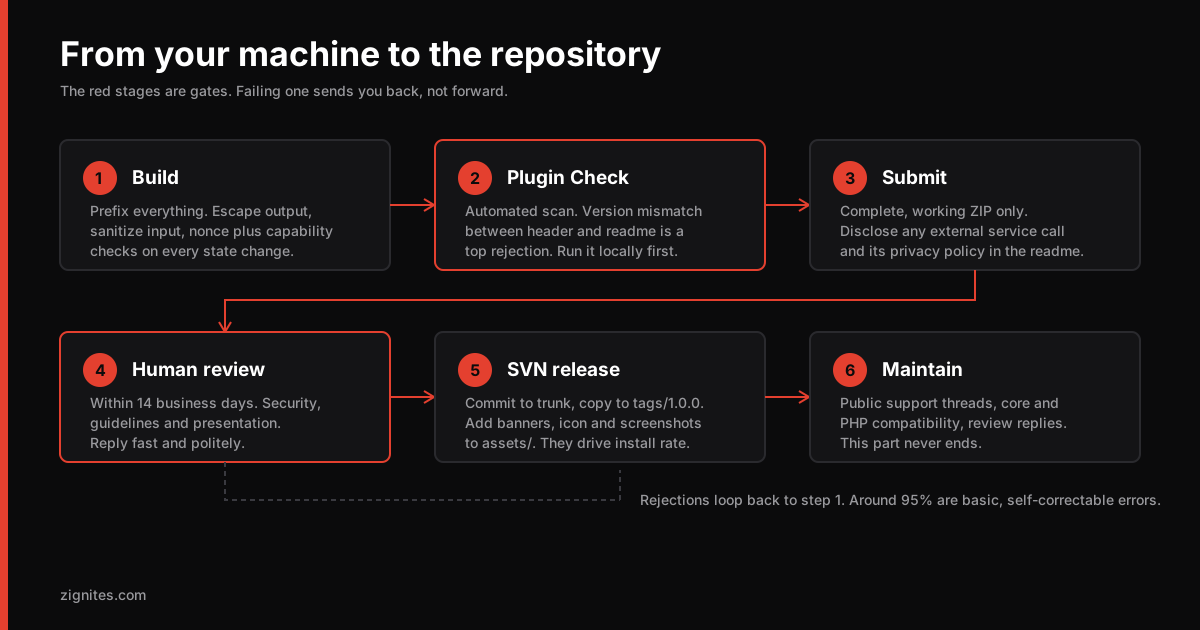
The catch is that "get it approved" trips up more people than the code does. Reviewers report that a handful of basic, self-correctable errors account for around 95% of rejections. Almost none of them are hard. They are just documented in a handbook nobody reads until after the rejection email.
This is not a walkthrough written from the documentation. Site Extensions Snapshot has been in the WordPress.org plugin directory since March 2026 and is still shipping updates, so the steps below are the ones we went through and the ones we keep going through on every release.
Here is the whole path, in order.
Step 0: Check that your idea is not already solved
Search the repository before you write anything. If there are already twelve plugins doing this, you need a clear reason yours is different. "Mine is better written" is not a reason users can evaluate from a listing page.
The plugins that succeed tend to be one of three things:
Narrow and excellent. Does one thing that a bloated competitor does badly.
The bridge. Connects two systems that people already use together manually.
The unglamorous. Solves something tedious that nobody wanted to build. Logging, cleanup, migration, export.
Check the existing plugins' one-star reviews. That is a free product roadmap.
Step 1: Structure and naming
Get this right at the start because renaming later is genuinely painful.
my-plugin-slug/
├── my-plugin-slug.php        ← main file, headers live here
├── readme.txt                ← required, specific format
├── uninstall.php             ← clean up after yourself
├── includes/
│   ├── class-mps-plugin.php
│   ├── class-mps-admin.php
│   └── class-mps-settings.php
├── assets/
│   ├── css/
│   └── js/
└── languages/
    └── my-plugin-slug.pot
Everything you declare globally must be prefixed. Functions, classes, constants, option names, database table names, transients, hooks. Use a prefix of at least four characters that is unique to your plugin.
// Collides with someone eventually. Guaranteed.
function get_settings() {}
define( 'VERSION', '1.0.0' );
update_option( 'api_key', $key );

// Safe
function mps_get_settings() {}
define( 'MPS_VERSION', '1.0.0' );
update_option( 'mps_api_key', $key );
This is the single most common rejection reason. A generic function name in the global namespace will fatal-error somebody's site the day another plugin declares the same thing.
Your main file header:
<?php
/**
 * Plugin Name:       My Plugin Slug
 * Plugin URI:        https://example.com/my-plugin
 * Description:       One clear sentence about what it does.
 * Version:           1.0.0
 * Requires at least: 6.5
 * Requires PHP:      8.1
 * Author:            Your Name
 * Author URI:        https://example.com
 * License:           GPL-2.0-or-later
 * License URI:       https://www.gnu.org/licenses/gpl-2.0.html
 * Text Domain:       my-plugin-slug
 * Domain Path:       /languages
 */

defined( 'ABSPATH' ) || exit;   // never allow direct file access
That last line goes at the top of every PHP file in the plugin. Without it, someone can request your file directly and execute it outside of WordPress.
Note the version number appears in both the plugin header and readme.txt. If they disagree, the automated check rejects you before a human ever looks. It is a top rejection cause and it takes four seconds to verify.
Step 2: Security, which is where reviewers focus hardest
Four rules cover nearly everything the review team will flag.
Escape everything on output
echo esc_html( $user_name );
echo '<a href="' . esc_url( $link ) . '">';
echo '<input value="' . esc_attr( $value ) . '">';
echo wp_kses_post( $rich_content );   // when you must allow some HTML
Escape at the point of output, every time, even when you are certain the value is safe. Certainty does not survive refactors.
Sanitize everything on input
$email = sanitize_email( $_POST['email'] ?? '' );
$title = sanitize_text_field( $_POST['title'] ?? '' );
$id    = absint( $_POST['id'] ?? 0 );
$url   = esc_url_raw( $_POST['url'] ?? '' );
Use nonces on every state-changing action
// Rendering the form
wp_nonce_field( 'mps_save_settings', 'mps_nonce' );

// Handling the submission
if ( ! isset( $_POST['mps_nonce'] )
  || ! wp_verify_nonce( $_POST['mps_nonce'], 'mps_save_settings' ) ) {
    wp_die( esc_html__( 'Security check failed.', 'my-plugin-slug' ) );
}
Check capabilities separately from nonces
This one catches experienced developers. A nonce proves the request came from your form. It does not prove the person is allowed to perform the action. You need both.
if ( ! current_user_can( 'manage_options' ) ) {
    wp_die( esc_html__( 'Insufficient permissions.', 'my-plugin-slug' ) );
}
And for database queries, always prepare:
$results = $wpdb->get_results( $wpdb->prepare(
    "SELECT * FROM {$wpdb->prefix}mps_records WHERE status = %s AND id > %d",
    $status,
    $min_id
) );
The security discipline here is the same discipline that applies to any API surface. If you want the broader version of this thinking, our OWASP API Top 10 breakdown covers the same failures in a different context.
Step 3: Write readme.txt properly
This file is both a hard technical requirement and your entire marketing page on wordpress.org. Most developers treat it as paperwork and lose installs because of it.
=== My Plugin Slug ===
Contributors: yourwporgusername
Tags: tag-one, tag-two, tag-three
Requires at least: 6.5
Tested up to: 6.9
Requires PHP: 8.1
Stable tag: 1.0.0
License: GPLv2 or later
License URI: https://www.gnu.org/licenses/gpl-2.0.html

One clear sentence describing what this plugin does, under 150 characters.

== Description ==

What problem it solves and who it is for. Write for a site owner, not
a developer. Lead with the outcome, not the feature list.

== Installation ==

1. Upload to /wp-content/plugins/ or install through the plugins screen.
2. Activate through the Plugins menu.
3. Configure under Settings > My Plugin.

== Frequently Asked Questions ==

= Does this work with multisite? =

Yes, network activation is supported.

== Changelog ==

= 1.0.0 =
* Initial release.
Three things people get wrong:
Stable tagmust match a real SVN tag and match your plugin header version. Mismatches are a top automated rejection.Tags are limited to twelve, and stuffing them looks like spam to both users and reviewers.
Tested up toshould reflect a version you actually tested against. Leaving it stale makes your plugin look abandoned in search listings. It is also the field our free WordPress plugin checker reads back off a live site, so you can see how your own listing looks from the outside.
Step 4: Run Plugin Check before you submit
This is the step that saves you two weeks.
Your submission is automatically scanned by the Plugin Check tool for basic issues such as version mismatches, invalid tags and coding standard violations. If it finds errors, your plugin does not enter the human review queue until you fix them.
Run it yourself first:
wp plugin install plugin-check --activate
wp plugin check my-plugin-slug
Also run PHP CodeSniffer with the WordPress standard:
composer require --dev wp-coding-standards/wpcs
vendor/bin/phpcs --standard=WordPress my-plugin-slug/
Fix everything both tools report. Every warning you clear here is a week you do not spend in a review round trip.
Step 5: Submit and wait
Upload a complete, fully functional ZIP at wordpress.org/plugins/developers/add. Partial plugins are rejected. There is no "we will add that feature after approval."
Once queued, the Plugin Developer Handbook says the team will review the code for any issues within 14 business days. Read that as the published target for the review step, not as an end-to-end timeline, and note that 14 business days is close to three calendar weeks rather than a fortnight. Real waits vary with the size of the queue. They check security, guideline compliance, and general presentation. Some notes on the experience:
Reviews come from volunteers doing careful work. Reply politely and promptly. A same-day fix and a clear response often resolves things in one round.
If your plugin calls an external service, you must disclose it in the readme, including what data is transmitted and a link to that service's terms and privacy policy. Undisclosed external calls are a firm rejection.
Everything you ship must be GPL-compatible. A bundled library under a restrictive licence will fail.
Do not include tracking, upsell nags on activation, or admin notices that cannot be dismissed. Reviewers dislike them and so do users.
On approval you get an SVN URL at https://plugins.svn.wordpress.org/your-plugin-slug.
Step 6: SVN, which is not as bad as its reputation
svn co https://plugins.svn.wordpress.org/my-plugin-slug
cd my-plugin-slug

# put your files in trunk/
cp -r ~/dev/my-plugin-slug/* trunk/
svn add trunk/* --force
svn ci -m "Initial release 1.0.0"

# tag the release
svn cp trunk tags/1.0.0
svn ci -m "Tag 1.0.0"
The assets/ directory sits alongside trunk/ and tags/, and it holds your listing graphics rather than plugin code:
banner-1544x500.pngandbanner-772x250.pngicon-256x256.pngandicon-128x128.pngscreenshot-1.png,screenshot-2.png, matching the== Screenshots ==section in your readme
These are your storefront. A plugin with a blank banner and no screenshots converts noticeably worse than an identical one with decent graphics, and this is the cheapest install-rate improvement available to you.
What happens after launch
The repository listing is the beginning, not the end.
Support requests arrive immediately and they are public. Unanswered threads are visible on your plugin page and they damage trust. Answering within a day or two, even with "looking into it," makes a real difference to how the plugin is perceived.
Reviews are heavily weighted toward extremes. Delighted users and furious users write reviews. Satisfied users do not. Ask for reviews at a genuine moment of success in the plugin, not with a persistent admin banner.
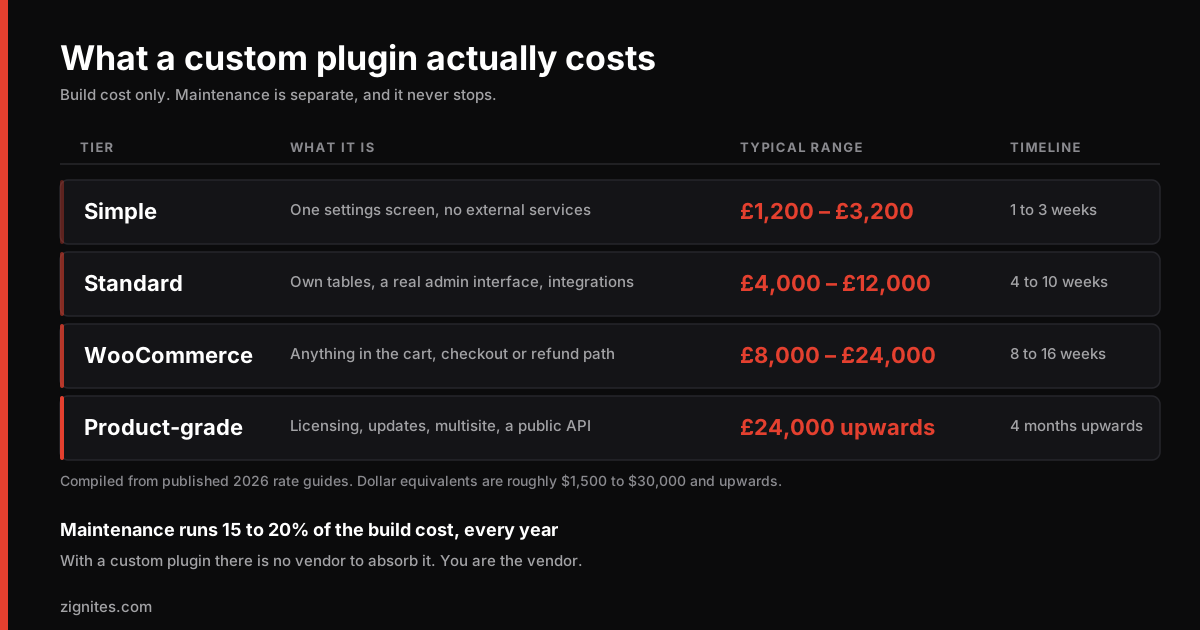
Compatibility maintenance is the ongoing cost. WordPress core releases, PHP version changes, and popular plugin updates all need testing. A plugin that stops being maintained gets flagged as untested and quietly disappears from search results. It is also the line most often left out of a budget, which is why what custom plugin development costs treats maintenance as a separate annual figure rather than a footnote. You can see the pattern in our checks of whether popular WordPress plugins are still maintained, which read each plugin's release dates, tested-up-to version and directory status.
The repository is a funnel, not a product. Most sustainable plugin businesses give away a genuinely useful free version and sell a pro tier for the advanced use cases. The free tier has to actually solve a problem on its own, otherwise it just generates one-star reviews.
The honest summary
Building the plugin takes a week. Making it secure, correctly prefixed, properly documented and approvable takes another. Maintaining it takes forever.
That last part is what people underestimate. If you are building a plugin as a business asset rather than a weekend project, budget for the maintenance from the start.
We build and maintain WordPress plugins for clients who want the distribution channel without owning the ongoing work. If that sounds like your situation, tell us what you are trying to build.
Keep reading