The WordPress plugin checker has one text box. You type a website address, and a server I pay for goes and fetches it.
Read that sentence the way an attacker would. A stranger types an address, and my server makes a request to it, from inside a cloud network, with whatever access that network position carries. Detecting WordPress plugins is what the tool is for. Not being turned into a way to reach things it should never touch is what most of the code is actually about.
This post covers both halves: how the checker works out which plugins a site runs, and the layers that keep that URL field from pointing anywhere private. All the code below is from the running tool, trimmed for length, and covered by its test suite.
Part one: finding plugins from outside a site
I wrote about detection on its own in The Obvious Way to Detect WordPress Plugins Counts WooCommerce Six Times. That piece covers the general techniques. Here is what the checker itself settled on, which is narrower.
Two signals, kept apart
The checker uses two kinds of evidence and never merges them, because they are not equally trustworthy.
Asset paths. When a plugin loads a stylesheet, script or image, its folder shows up in the page's HTML as /wp-content/plugins/<slug>/. That is proof a folder by that name exists on the server.
const PLUGIN_PATH = /\/wp-content\/plugins\/([A-Za-z0-9][A-Za-z0-9._-]{0,61})[/'"?]/g

export function extractFromHtml(html: string): Map<string, number> {
  const counts = new Map<string, number>()
  for (const match of html.matchAll(PLUGIN_PATH)) {
    const slug = match[1].toLowerCase()
    if (!isValidSlug(slug, "path")) continue
    counts.set(slug, (counts.get(slug) ?? 0) + 1)
  }
  return counts
}
REST namespaces. The site's /wp-json/ index lists every route prefix that active code has registered. That catches plugins with nothing on the front end, but a namespace is just a name, and any code can register any name.
Every plugin in a report carries which of the two found it: path, namespace, or both. When the report has to choose (it shows at most 30 plugins), path evidence wins.
Mapping names to the plugin that owns them
WooCommerce registers eleven REST namespaces, including wc, wc-admin, wc-analytics, wc-telemetry and wccom-site. Take the segment before the slash and you get six rows for one plugin, none of which is woocommerce. Yoast SEO registers yoast/v1, but its directory slug is wordpress-seo.
So namespace evidence goes through a map from the names a plugin registers to its directory slug. The map uses exact names, not prefixes:
const FAMILY_MAP: Record<string, string> = {
  wc: "woocommerce",
  "wc-admin": "woocommerce",
  "wc-admin-email": "woocommerce",
  "wc-analytics": "woocommerce",
  "wc-telemetry": "woocommerce",
  "wccom-site": "woocommerce",
  "wc-blocks": "woocommerce",
  // ...
}
A blanket wc- rule would be shorter, and it would be wrong. wc-vendors and wc-serial-numbers are separate plugins by other authors with their own directory listings. Folded into WooCommerce, they would disappear from the report. Prefixes are only used where one plugin genuinely owns the whole space.
The map only ever applies to namespaces. A folder name from an asset path is never rewritten, because it is the most authoritative name the checker has.
Corroborate or drop
A slug that only ever appeared as a namespace has two innocent explanations: it is a plugin, or it is a name some theme or bespoke code registered. Nothing in the response tells them apart, so the checker asks the WordPress.org directory.
export function corroborate(plugins: DetectedPlugin[], lookups: Map<string, WporgLookup>) {
  return plugins.filter((plugin) => {
    if (plugin.evidence !== "namespace") return true
    const lookup = lookups.get(plugin.slug)
    if (lookup?.state === "not_found") return false
    if (lookup?.state === "found" && lookup.meta.closed) return false
    return true
  })
}
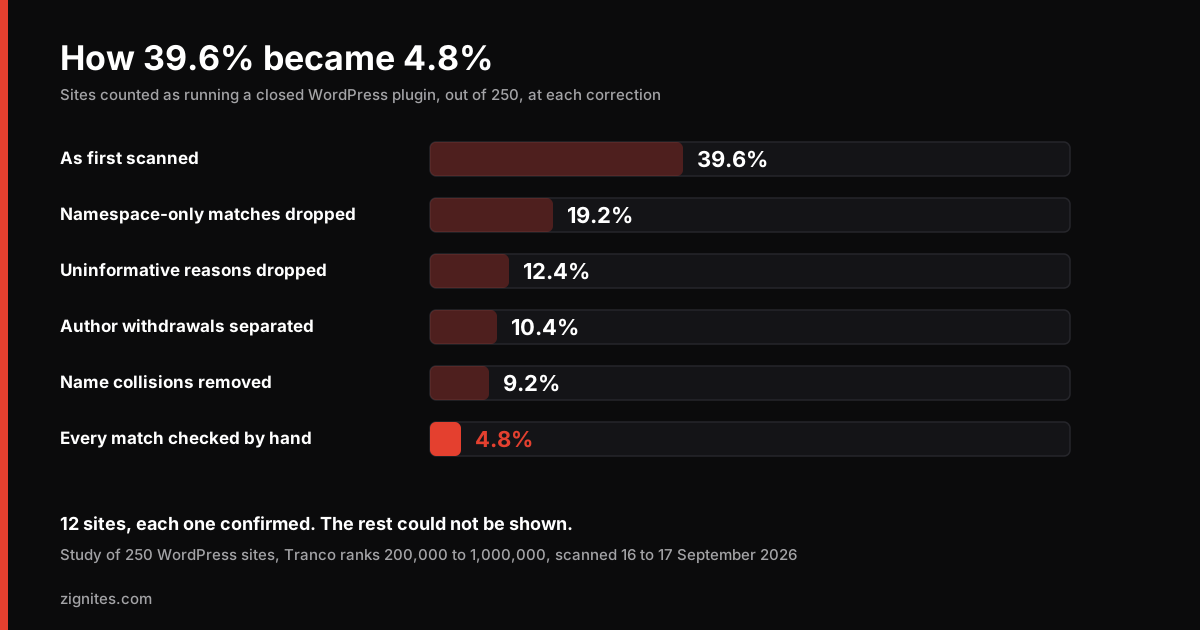
Two details matter. Only an explicit "not found" drops a row; if the directory API is down, the row stays, because shrinking a report over our own outage would hide the reason. And a closed listing is never reported on namespace evidence alone. In the study of 250 WordPress sites, one namespace shared its name with a closed standalone listing and wrongly put a closure on 28 sites. A closure now needs a real asset path behind it.
Dropping is silent on purpose. The alternative, a row reading "unknown plugin, not in directory", is a false positive dressed up as a finding, and a WordPress developer spots it in seconds and stops trusting the rest of the page.
Versions: confirmed or inferred
The accurate source is the plugin's own readme.txt, which carries a Stable tag line. The checker reads it only where the site's robots.txt allows, and it does not count trunk as a version.
The fallback is the ?ver= value on the plugin's asset URLs, which needs two filters:
if (coreVersion && version === coreVersion) continue
if (!isPlausibleVersion(version)) continue
The first exists because WordPress fills in its own core version when a plugin registers an asset without one. Take that at face value and a current plugin looks years behind. The second exists because ?ver= is a cache-busting parameter and plenty of sites put a content hash in it, which once showed up in a report's version column as if it were a release. A value has to look like a dotted version number to count.
Every version in a report is labelled with its source: confirmed from a readme, or inferred from an asset URL. The checker uses the WordPress core version only to discard those false ?ver= values. It never displays it, because publishing a site's exact core version is handing someone a shortlist.
Part two: the SSRF guard
Server-side request forgery is getting a server to make a request you could not make yourself. The classic target for a tool like this is 169.254.169.254, the cloud metadata address, which on many hosting platforms will hand credentials to whatever asks from inside. Close behind it are localhost, private network ranges, and internal services that trust anything arriving from inside their own network.
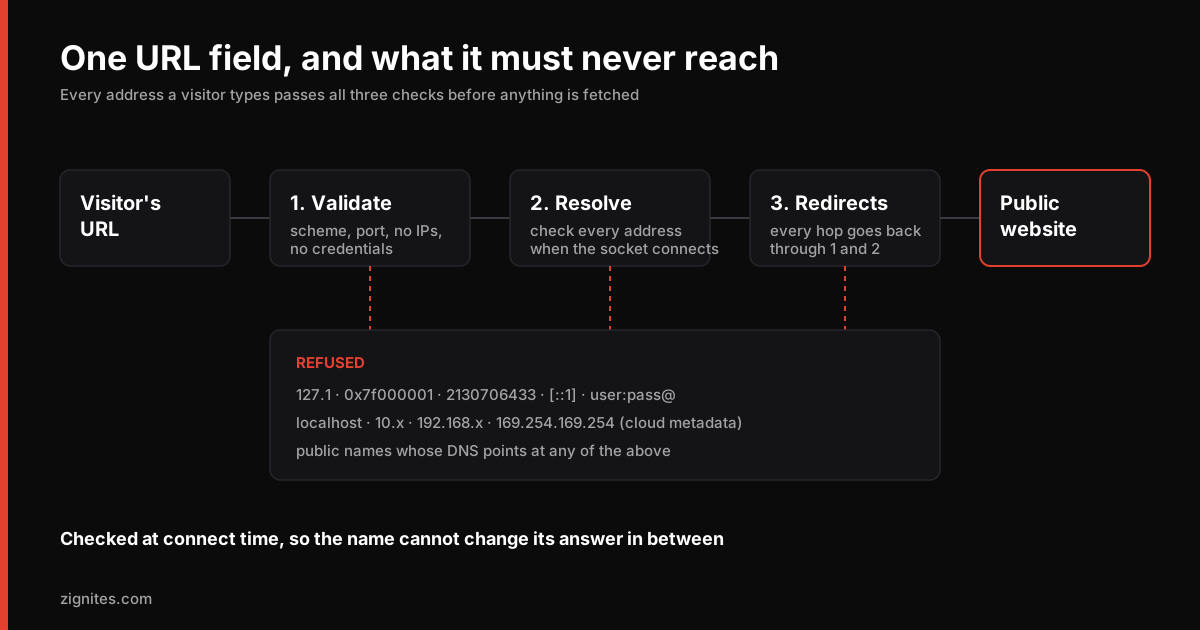
There is one rule above all the others: exactly one function in the codebase may make a request to an address that came from a visitor. Everything that touches a scanned site goes through it. Here is what it does, layer by layer.
Layer 1: refuse bad input before doing anything
The address is normalised and validated before any network activity:
Only
http:andhttps:. Nofile:,gopher:,data:or anything else.No credentials in the URL.
https://user:pass@site.comis refused outright. The checker sends no authentication to anyone, andhttps://trusted.com@other.com/is an old way to make a person read the wrong hostname.Standard ports only. Ports 80 and 443.
No local names.
localhost, and anything ending in.local,.internal,.lanand similar.No hostnames that mix alphabets within a label, so a Cyrillic letter that looks Latin cannot pass for a familiar domain.
No IP addresses at all. This one deserves its own section.
Layer 2: a hostname that looks like a number is refused
The obvious way to block 127.0.0.1 is to parse the host as an IP and check its range. The trouble is that the system resolver accepts far more spellings of an IP address than most parsers do. All of these mean 127.0.0.1 to it:
2130706433(the whole address as one decimal number)0x7f000001(hex)0177.0.0.1(octal)127.1(a short form that fills in the zeros)
A strict parser looks at 0177.0.0.1, decides it is not an IP, treats it as a hostname, and hands it to the resolver, which connects to loopback. So the checker does not try to out-guess the resolver. It refuses the whole shape:
export function looksNumeric(hostname: string): boolean {
  const host = hostname.replace(/^\[|\]$/g, "")
  if (isIP(host) !== 0) return true

  const labels = host.split(".")
  if (labels.length < 1 || labels.length > 4) return false
  return labels.every((label) => /^(0[xX][0-9a-fA-F]+|\d+)$/.test(label))
}
A website has a domain name. No real site needs to be scanned by bare IP, so the checker never has to be right about every notation the resolver understands. Refusing the shape is simpler and safer than imitating the resolver.
Layer 3: check the address the name resolves to, when the socket connects
Validating the hostname is not enough. Anyone can register a domain and point its DNS at 127.0.0.1. Free services exist that do exactly that for any name you like. The hostname looks public; the address is not.
So the address has to be checked after DNS resolution. And where it is checked matters as much as whether. If you resolve the name, check the result, then let the HTTP client connect, the client resolves the name again. An attacker controlling the DNS can answer the first lookup with a public address and the second with a private one. That gap between checking and using is how DNS rebinding works.
The checker closes it by doing the check inside the socket's own DNS lookup:
export function createGuardedLookup(resolver = dns.lookup) {
  return function guardedLookup(hostname, options, callback) {
    resolver(hostname, { ...options, all: true }, (err, addresses) => {
      if (err) return callback(err, "")

      for (const entry of addresses) {
        const detail = classifyAddress(entry.address)
        if (detail) return callback(new BlockedAddressError(detail), "")
      }

      const first = addresses[0]
      callback(null, first.address, first.family)
    })
  }
}
That function is handed to Node's https.request as its lookup option. The socket then connects to exactly the address the hook returned, so there is no second resolution and no window for the answer to change.
It also rejects the hostname if any address it resolves to is blocked, not just the one it would have used. A name with one public record and one loopback record is hostile by construction, and picking the safe-looking one would be trusting a round robin.
The block list covers the ranges you would expect (loopback, the private ranges, link-local including the metadata address, carrier-grade NAT, multicast, reserved and documentation ranges) and their IPv6 equivalents. It also covers the ways IPv6 can carry an IPv4 address inside it: an IPv4-mapped address like ::ffff:127.0.0.1 is unwrapped and checked against the IPv4 rules, and the tunnelling prefixes that can route to an embedded IPv4 address are refused outright. Anything the classifier cannot parse counts as blocked. When the destination is unknown, the answer is no.
This is also why the scan endpoint runs on Node rather than an edge runtime. Edge runtimes have no socket-level DNS hook, and without it the guard would quietly fall back to checking strings, which is the thing this layer exists to say is not enough.
Layer 4: every redirect is a new request
A public URL that redirects to http://169.254.169.254/ is the standard way around a guard that validates once and lets the HTTP client follow redirects on its own.
The checker never lets the client follow anything. Each response with a Location header comes back to the loop, the new URL goes through every check from layer 1 onward, and only then is it requested. There is a small fixed limit on how many hops it will follow before giving up.
Layer 5: bound what a response can cost
Getting the address right is not the only way a fetch can hurt you. A hostile server can also send something enormous, or something that never ends.
A content-type allowlist. HTML where HTML is expected, JSON where JSON is expected. Anything else is refused before the body is read.
A size cap that counts decompressed bytes. A gzip response that is small on the wire can expand to gigabytes. The checker asks for uncompressed responses, and when a server compresses anyway, the decompressor itself is told to stop at the cap, so a decompression bomb dies inside zlib rather than in memory.
Timeouts on every request, and a deadline on the whole scan.
A per-scan request budget. One scan can only make a fixed number of outbound requests, whatever the site does. The budget is passed into each fetch rather than kept in module state, because a serverless instance is reused between visitors and a shared counter would leak one person's scan into the next.
Nothing sent, nothing kept. No cookies, no auth headers, and no
Set-Cookieis ever read back.
What a refusal tells you
When the guard refuses an address, the visitor sees "We can only scan publicly reachable websites." It never says which rule fired. That detail is only useful to someone mapping the block list.
What production does today
I re-ran these against the live endpoint on 12 October 2026, the day this was written:
Input | Result |
|---|---|
| 400, invalid URL |
| 400, invalid URL |
| 400, invalid URL |
| 400, invalid URL |
| 400, invalid URL |
| 400, invalid URL |
| 400, invalid URL |
| Accepted as names, then refused at connect: "We can only scan publicly reachable websites." No request reached a private address. |
Too many attempts in an hour | 429, with a |
The middle row is the one that matters most. Those hostnames pass every string check, because they are ordinary public domain names. They are stopped by layer 3, at the point the socket would have connected.
Part three: rate limits and caching
A scan costs real compute time and a burst of outbound requests, so the endpoint is rate limited. Three design choices did most of the work.
The limit lives in the database, not in memory. On serverless hosting, an in-memory counter is really a counter per instance until the instance is recycled, which under real traffic is no limit at all. The checker counts rows in its own scans table instead. One scan is already one row, so there is nothing separate to keep in step and nothing to expire.
Repeat questions are free. A completed scan of the same address is served from cache for a day, and a cached answer returns before the rate limiter is consulted, so asking again costs no allowance. Cheap checks run first (validation, the opt-out list, the cache) and the limiter guards only the expensive part.
Failures that cost nothing do not spend an allowance. Mistype a domain and the scan fails at DNS, having done almost no work. Charging a full scan for that would punish typos. Those attempts do count toward a separate, higher ceiling, so nobody can make the scanner try an unlimited number of addresses either.
Around those sit a few blunter controls: a cap on scans running at once, a monthly budget guard that switches the tool to cached answers only if spending runs high, and a switch that turns scanning off without a code change. Visitor addresses are stored only as salted hashes.
Site owners can also opt out. A domain on the exclusion list is refused before any request is made, and the scanner identifies itself in its user agent with a link to a page explaining what it does.
What I chose not to build
Some of the most important decisions were about leaving things out.
No vulnerability data. Good vulnerability data for WordPress plugins sits behind commercial APIs. A free tool that fakes it can guess from version numbers, which flags plugins that are fine, or flag a few famous cases and stay quiet on the rest, which implies everything unflagged was checked. Both are worse than saying clearly that no security check was run. The checker reports maintenance facts the directory publishes, and says so.
Nothing a reviewer could call reconnaissance. No wp-login.php, no xmlrpc.php, no PHP files, no directory listings, no user enumeration through the REST API. The checker asks only for files a plugin author published on purpose.
No bare IP scanning. Websites have names, and refusing IP addresses entirely removed a whole class of parsing problems.
No WordPress core version in the report. It is used internally and never shown.
No guessing on unknown rows. A namespace the directory has never heard of is dropped rather than shown as a mystery plugin. A score built on 3 of 11 plugins says it was built on 3.
Every rule in this post removes something: a row, a request, a hostname, a redirect. That is deliberate. In detection, a plausible false positive costs more trust than a missing row. In a URL fetcher, one request to the wrong address costs more than refusing a thousand odd but harmless inputs.
Try it, or read the results
The WordPress plugin checker is free and needs no signup. For a single plugin, the plugin maintenance check covers widely installed plugins one at a time.
The same detection code ran a study across 250 WordPress sites, and its first answer was wrong by a factor of eight. How 39.6% became 4.8% walks through every correction.
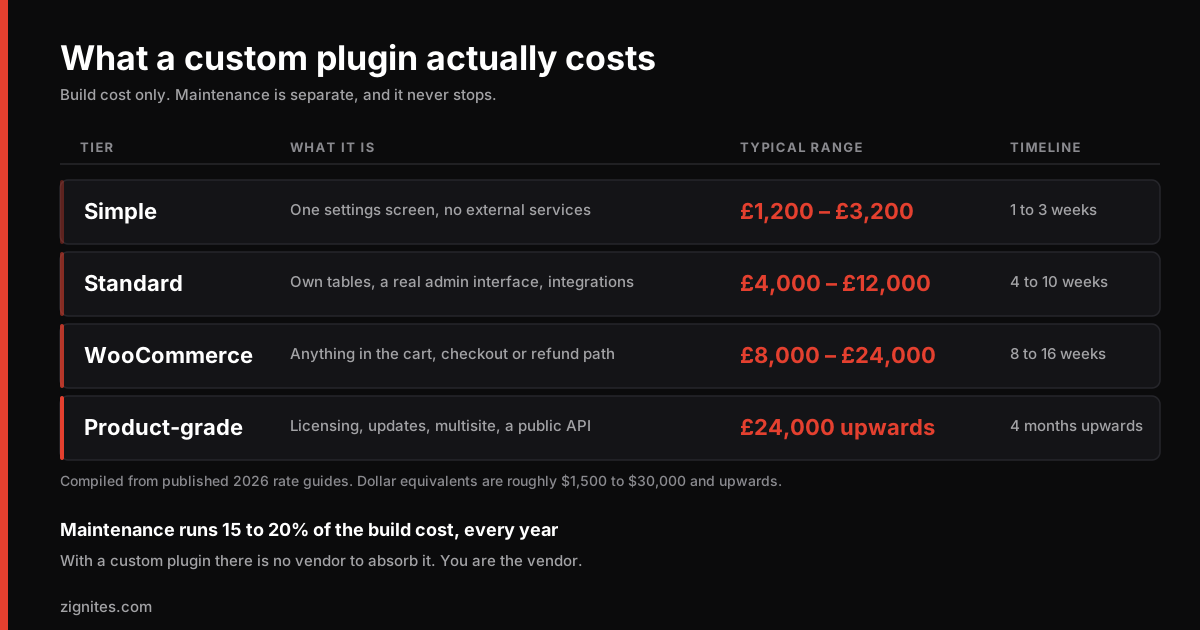
If you are building something similar and want a second pair of eyes on it, or you need a WordPress plugin built with the same care, that is the work we do: custom WordPress plugin development.