Site Extensions Snapshot
View every installed plugin and theme with status, version and author, then export the lot to CSV in one click. Built for audits, compliance checks and client handovers.
Published in the WordPress.org plugin directory.
Or install it from your WordPress dashboard: go to Plugins, Add New, and search Site Extensions Snapshot.
Why it exists
Documenting what is running on a WordPress site means scrolling the Plugins screen, then the Themes screen, copying names and version numbers by hand into a spreadsheet. It is tedious, and it goes stale the moment anything updates.
Site Extensions Snapshot adds one Tools page that lists every plugin and theme with its status, version, author and description, in a sortable, searchable table, and exports the whole thing to CSV in a single click.
It is not a security scanner
This tells you what is installed and what is out of date. It does not tell you whether any of it is vulnerable, abandoned or safe to run. It makes no external requests at all, so it has nothing to check a plugin against. If that is the question, the free WordPress Plugin Risk Report on this site answers it for a site you can reach over the web.
What it does
Why it matters
An inventory is only worth having if it is accurate at the moment you need it, and a spreadsheet stops being accurate the first time anything auto-updates. The point of reading it out of WordPress on demand is that there is no copy to go stale: the list is generated from what the site is running when you open the page.
Screenshots
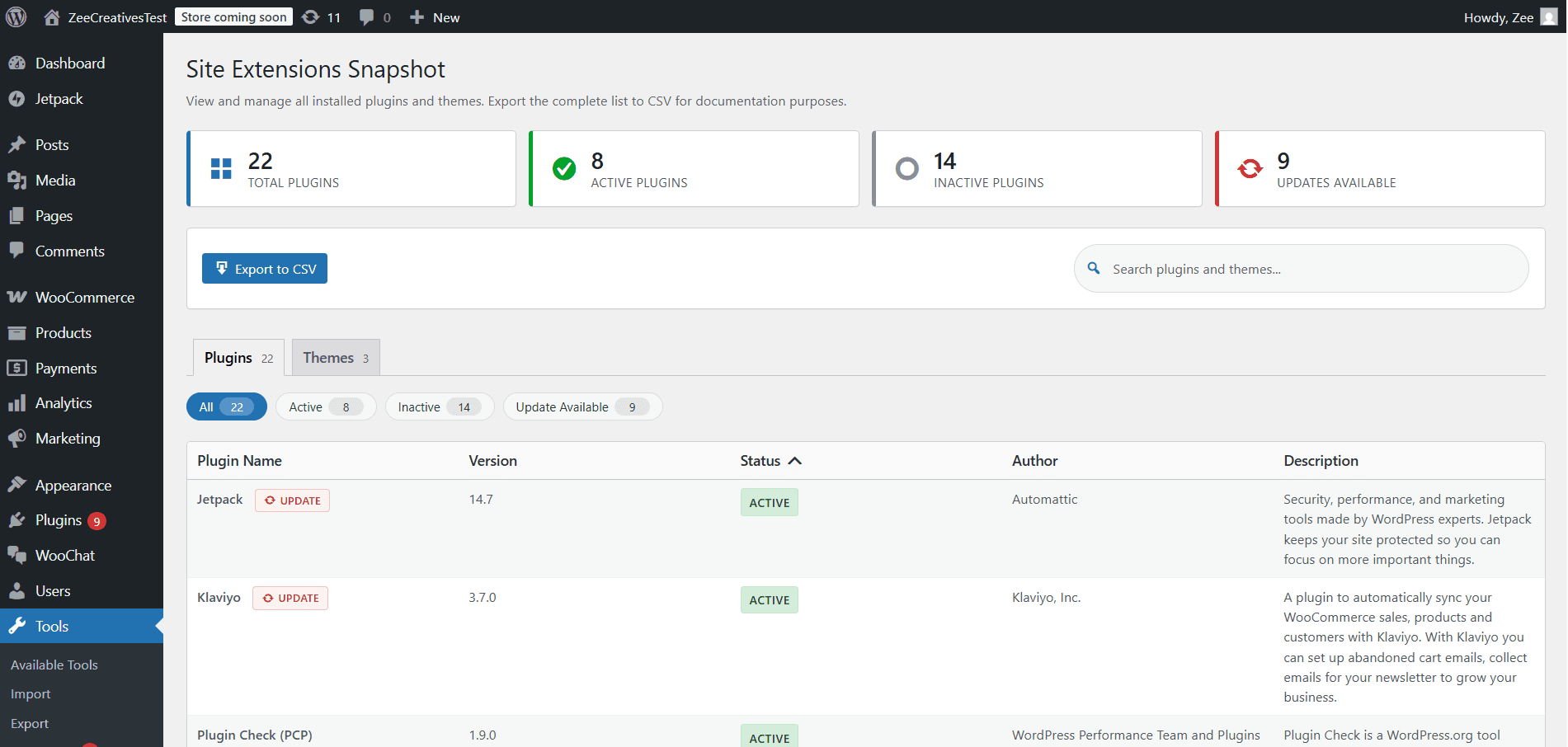
Plugins tab
Every installed plugin with status, version, author and description in one sortable table.
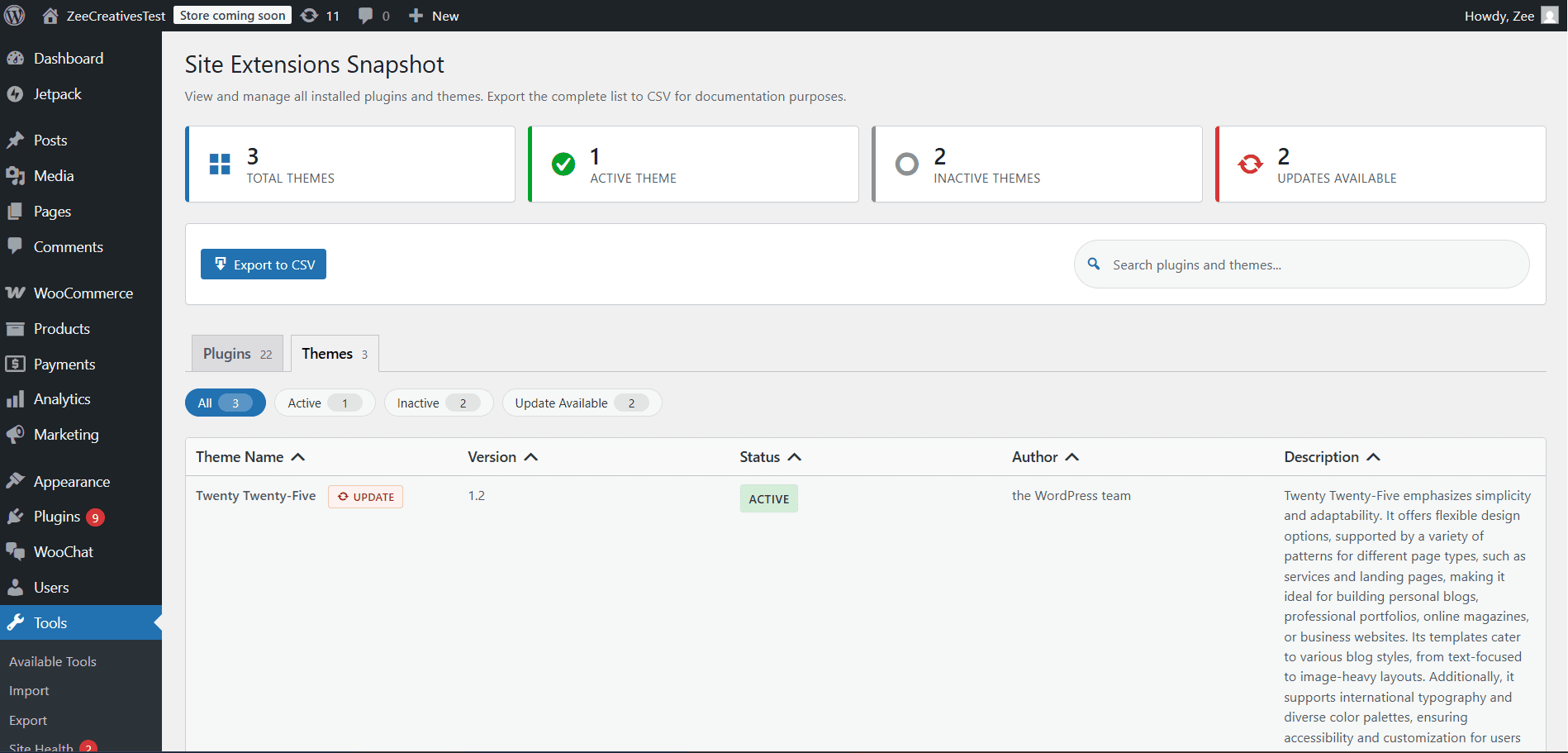
Themes tab
The same layout for themes, active versus inactive at a glance.
How it works
The plugin adds a single page under Tools. Opening it reads the plugin and theme data WordPress already holds in memory for the current request, joins it against the update transients core maintains, and renders both sets as tables. There is no scan, no cron job and no stored index, which is why the numbers cannot drift out of step with the site.
Active state is resolved with is_plugin_active() rather than by comparing against the active_plugins option directly. On a multisite install those two answers differ: a plugin can be network-activated and therefore genuinely running on a site whose own option does not list it. Reading the option alone reports it inactive, which is the wrong answer on exactly the installs most likely to need an audit.
The plugin and theme lists are cached for the length of the request, because the stats cards, the filter chips and the table body all need the same data. The sortable-table JavaScript is scoped to this screen's own table, so it cannot reorder an unrelated list table elsewhere in wp-admin.
What the CSV contains, per row:
- Name, as WordPress reports it from the plugin or theme header
- Type, so plugins and themes stay distinguishable once the two tabs are in one file
- Status, active or inactive
- Version currently installed
- Update Available, so an audit records what was already behind at the time it was taken
- Author
- Description
Requirements and limits
- Licensed GPLv2 or later, and free with no paid tier
What it does not do
Read-only by design. It will not activate, deactivate, update or delete anything, and it deliberately offers no bulk actions. The screen an auditor uses should not be a screen that can change what is being audited.
It reports that an update is available, not what is in it. Release notes, changelogs and diffs are not fetched, because fetching them would mean making external requests and this plugin makes none.
There is no scheduled export, no history and no diff between two points in time. Each export is a snapshot of the moment you pressed the button. Keeping the file is how you get a record.
Installing it and finding the screen
It is in the WordPress.org directory, so the normal route is Plugins, Add New, search for Site Extensions Snapshot, install and activate. To install it by hand instead, upload the site-extensions-snapshot folder to wp-content/plugins/ and activate it from the Plugins menu.
Once active the screen is at Tools › Site Extensions Snapshot. There is no settings page and nothing to configure, which is deliberate: every option this plugin could have offered would be a decision about how to display a list, and the filter chips and column sorting already cover it without persisting anything.
The only thing it writes to the database is a single option recording when it was activated. Deactivating it stops the screen appearing and leaves the site otherwise exactly as it was.
What it is actually used for
The case it was built for is a client handover. The pack needs to state what was running on the day the site changed hands: which plugins, which versions, which were already behind, and which themes were installed but inactive. Doing that by hand means alternating between two admin screens and retyping version numbers, and the result is stale before the document is signed.
The same export answers two other questions. During a compliance or licensing review it is the list of third-party code the site depends on, in a format a spreadsheet opens. And when a support ticket says the site broke after an update, an export taken before the work gives you the versions to compare against, which is usually faster than reading the update history back out of the site.
It is the least interesting plugin we publish, and that is the point. It does one small job completely, makes no network requests, cannot change anything, and has been in the directory since March 2026.
Frequently asked questions
Who can access the Site Extensions Snapshot screen?
Only users with the manage_options capability, which in a standard install means Administrators. The page lives under Tools › Site Extensions Snapshot.
Does it modify my plugins or themes?
No. It is entirely read-only. It reads the plugin and theme data WordPress already holds and displays it in a table. Nothing is activated, deactivated, updated or deleted.
What is in the CSV export?
Each plugin or theme's name, status, version, author and description: enough to drop straight into an audit document or a client handover pack.
Does it send any data anywhere?
No external requests are made at all. The only thing it writes to your database is a single activation timestamp.
Does it work on multisite?
Yes. Active state is resolved with is_plugin_active(), so a network-activated plugin is reported as active on the site you are viewing. Reading the active_plugins option directly would report it inactive, which is wrong on exactly the installs most likely to need an audit. The screen covers the current site rather than rolling up the whole network.
How does it know an update is available?
It reads the update information WordPress core already holds after its own update check. The plugin makes no external requests of its own, so if core has not run its check recently the badge reflects what core last saw rather than what the directory says this second.
Is it really free?
Yes. It is published in the WordPress.org directory under GPLv2 and there is no paid tier.
Related plugins
Site Info Scout
Generate a complete WordPress site report covering environment details, active plugins and configuration. Useful for support tickets and audits.
View MaintenanceZignites Sentinel
Create a checkpoint of your active theme and plugins before updating, validate that the checkpoint is sound, and restore it if an update breaks the code layer.
View PerformanceTurboBlocks
Disable unused CSS and JavaScript on WooCommerce sites with per-page rules and context-aware detection. Reduce page weight and improve Core Web Vitals without breaking checkout.
ViewGet Site Extensions Snapshot
Install it from the WordPress.org directory, or talk to us about adapting it to your site.
Working out what a site already has? Check its plugins free and see which of them are still maintained.