Every week we get a version of the same message. Someone has watched a demo where an AI agent reads an inbox, updates a CRM, drafts a reply and books a meeting, and they want to know what it would cost to have that.
The honest answer is that the demo is real and the outcome usually is not. Not because the technology does not work, but because the demo skipped the part where somebody has to decide what "correct" means, what happens when the agent is wrong, and who notices.
Gartner expects more than 40% of agentic AI projects to be cancelled by the end of 2027, citing escalating costs, unclear business value and inadequate risk controls. MIT's Project NANDA looked at 300 public AI deployments and found roughly 95% of generative AI pilots produced no measurable return. Those two numbers describe the same problem from opposite ends.
This post is about landing in the other 5%. Not by being cleverer, but by picking a smaller first problem.
Why most automation projects quietly fail
The failure is almost never the model. Modern models are entirely capable of classifying an email, extracting a total from an invoice, or drafting a first-pass reply. The failure is structural, and it repeats in four shapes.
The process was never defined. You cannot automate a decision nobody has written down. If two people in your team would handle the same enquiry differently, an agent will handle it a third way and everybody will call that a bug.
There is no validation step. The output goes straight into the system of record. When it is wrong, nothing catches it, and the error surfaces two weeks later in a customer conversation.
Nobody owns the failure path. Real workflows have exceptions. If the answer to "what happens when the agent is unsure" is "it guesses," you have built a liability rather than a tool.
The value was never measured. The workflow ships, everyone agrees it feels faster, and six months later nobody can say whether it saved anything. This is the one that kills the second project, because there is no evidence to justify it.
The gap between a demo and a deployment is not model quality. It is the unglamorous work of defining correct, catching wrong, and proving it mattered.
The test a workflow has to pass before it is worth automating
Before scoping anything, run the candidate through these five questions. If it fails two or more, pick something else. There is always something else.
1. Does it happen often enough? Under roughly five times a week, the build cost will not amortise. This is the single most common reason a technically successful automation is a commercial failure.
2. Are the rules stable? If the process changed twice last quarter, automating it now means rebuilding it next quarter. Automate the settled parts of your business, not the parts you are still figuring out.
3. Is the input structured or reliably semi-structured? Emails, forms, invoices and support tickets are fine. "Whatever the client sends us, in whatever format" is not, at least not for a first project.
4. Is a wrong answer recoverable? Drafting a reply that a human sends is recoverable. Issuing a refund is not. Start where mistakes are cheap and visible.
5. Can you measure the before? If you cannot state today's cost in hours or errors, you will not be able to prove the after. Measure for two weeks before you build anything. This feels like a delay and it is the highest-return two weeks in the project.
Where the returns actually are
Across the work we have done and the patterns we see repeatedly, the reliable wins cluster in a narrow band. They share a shape: high frequency, structured input, human stays in the loop, mistakes are visible immediately.
Workflow | Why it works | Where it goes wrong |
|---|---|---|
Enquiry triage and routing | High volume, stable categories, wrong routing is caught within minutes | Categories that overlap; no "unsure" bucket |
Draft-then-approve replies | Human sends, so errors never reach the customer unreviewed | Drafts so generic that editing takes longer than writing |
Document and invoice extraction | Structured output, trivially verifiable against the source | No confidence threshold, so bad extractions post silently |
Lead enrichment and scoring | Read-only, low blast radius, compounding value in the CRM | Scoring model nobody trusts because the logic is opaque |
Internal knowledge retrieval | Answers cite the source doc, so users self-verify | Stale index; the answer is right for a policy you changed |
Report and summary generation | Recurring, time-boxed, output reviewed before it circulates | Summaries that omit the exception, which was the point |
Notice what is missing. Nothing on that list lets an agent take an irreversible action on its own. That is deliberate, and it is the difference between the projects that survive their first month and the ones that get switched off.
The build versus buy decision, honestly
There are three routes and most businesses should not start at the third.
Off-the-shelf features inside tools you already pay for. Your helpdesk, CRM and accounting software have shipped AI features. They are narrow, they are included, and they require no engineering. Exhaust these first. A meaningful number of the automation briefs we receive describe something the client's existing subscription already does.
Workflow platforms. n8n, Make, Zapier and similar. You connect the systems, the platform runs the schedule and handles retries. Genuinely good for connecting three or four systems with straightforward branching logic.
The honest limits: per-operation pricing gets expensive at volume, debugging a failed run in a visual builder is slower than reading a stack trace, and complex conditional logic in a node graph becomes unmaintainable faster than people expect. Self-hosting n8n avoids the pricing problem and introduces an ops problem, which is a fair trade if you already run infrastructure.
Custom builds. Worth it when you have real volume, when the logic is specific enough that a generic platform fights you, when data cannot leave your environment, or when the workflow is a product feature rather than an internal convenience.
The rule of thumb we use: if you can describe the workflow as a straight line with two or three decision points, use a platform. Once you are drawing a diagram to explain it, or once you are writing custom code inside platform nodes to make it work, the platform has stopped saving you money.
The arithmetic, done properly
Most automation business cases are wrong in the same direction. They count the hours saved and stop.
The number people calculate:
hours saved per week × hourly cost × 52
  = annual saving
The number that is actually true:
  (hours saved per week × loaded hourly cost × 52)
− platform and model costs
− ongoing maintenance hours
− the cost of errors that get through
  = real annual saving

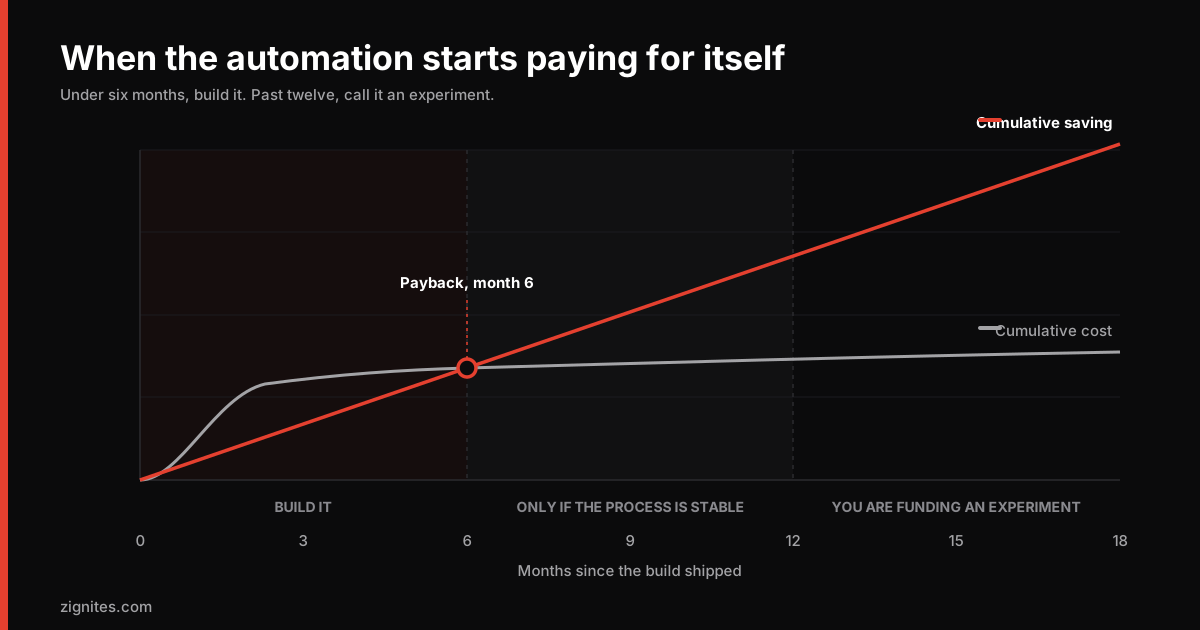
build cost ÷ real annual saving × 12 = payback in months
Three corrections that change the answer more than people expect.
Use loaded cost, not salary. Salary plus employer taxes, tooling, and overhead. This usually raises the true hourly figure by 25% to 40%, which works in favour of the business case.
Budget maintenance at 15% to 20% of build cost annually. APIs change, models get deprecated, your process shifts. Automation is not a fixed asset. Every business case we have seen that ignored this was wrong within a year.
Price the errors. If the workflow is right 95% of the time and the remaining 5% costs an hour of someone's time to unpick, that goes in the model. A 95% accurate automation on a high-volume workflow can generate more work than it removes.
If payback is under six months on that honest arithmetic, build it. Between six and twelve, build it only if the workflow is stable. Beyond twelve months, you are funding an experiment, which is fine as long as everyone calls it that.
What we would build first for a services business
Concretely, for a small agency or professional services firm with no automation in place, the first project is almost always the same shape.
Two weeks of measurement. Log how long enquiry handling actually takes, and how often each category comes up. No building.
Triage only. Inbound enquiries get classified and routed. No drafting, no sending, no CRM writes.
An explicit unsure path. Anything below the confidence threshold goes to a human queue rather than being forced into a category. This one design decision determines whether people trust the system.
Logging from day one. Every classification, its confidence, and whether a human overrode it. This is your accuracy data, and without it you are guessing.
Review at four weeks. Override rate under 10% means extend to drafting. Above that, the categories are wrong, and no amount of prompt work fixes wrong categories.
That is a small project. It is also the version that gets a second project funded, which is the actual goal.
The security part nobody scopes
When an automation touches your systems, it needs credentials. This is where small businesses take on risk they have not priced.
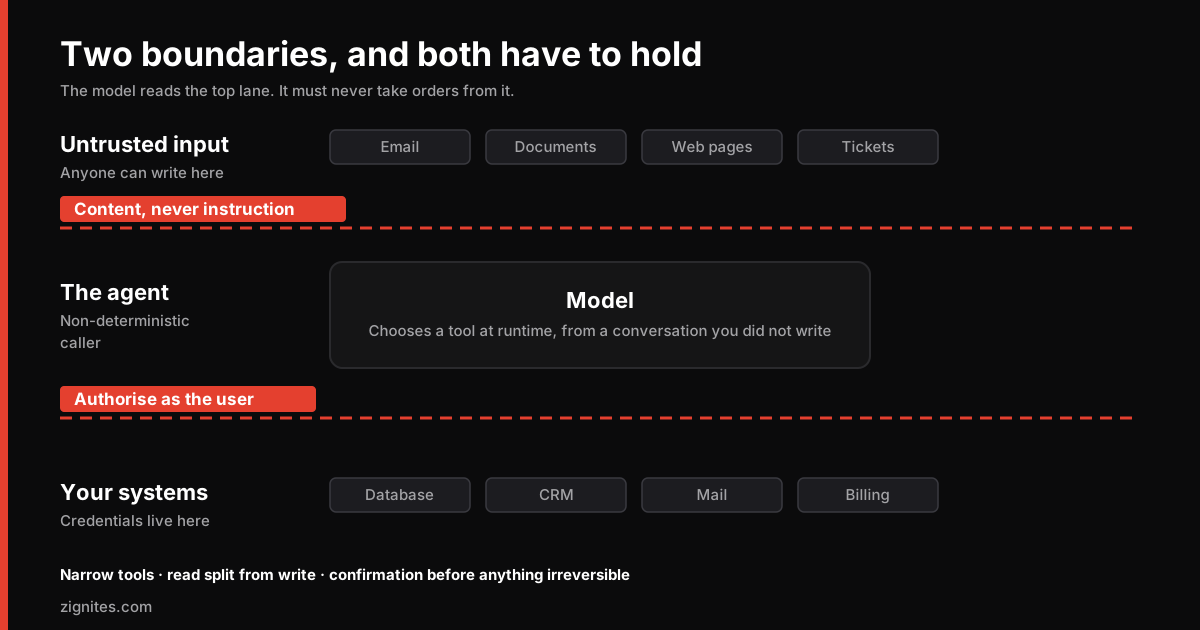
The common pattern is an API key with broad permissions, stored in a workflow platform, used by an agent that also processes untrusted input from the outside world. That combination (over-privileged credentials plus untrusted input) is the root of most agent security incidents, and it is worth understanding before you connect anything to a live system.
Three rules that cost nothing at the start and a great deal to retrofit:
Scope every credential to the minimum. A triage workflow needs read access to the inbox. It does not need send access.
Separate read from write. Different credentials, so a compromised read path cannot write.
Log every action with enough context to reconstruct it. When something goes wrong you need to answer "what did it do and why" in minutes.
We go deeper on the authorisation failures behind most of these incidents in the OWASP API Top 10, with actual fixes. If you are about to give an automation write access to anything, read that one first. And if the thing you are connecting is an agent rather than a scheduled job, the protocol layer has its own failure modes, which we cover in MCP in production.
The uncomfortable conclusion
The businesses getting real value from AI automation in 2026 are not the ones with the most sophisticated implementations. They are the ones who automated something small, measured it honestly, and let that result decide what came next.
The 95% figure is not evidence that the technology fails. It is evidence that starting with an ambitious project is a bad strategy, because ambitious projects have too many ways to be wrong at once and no way to isolate which one it was.
If you have a workflow in mind and you are not sure whether it clears the bar, tell us what it is. We will run it through the same five questions and tell you honestly if the answer is no. Quite often it is, and knowing that in a twenty minute conversation is worth more than finding out in month four.
You can see how we approach this work on our AI automation services page.
Common questions
Does AI automation actually save money for small businesses?
It can, but the base rate is poor. MIT's Project NANDA found roughly 95% of generative AI pilots produced no measurable return, and Gartner expects over 40% of agentic AI projects to be cancelled by the end of 2027. The projects that do pay back share a pattern: a single high-frequency workflow with stable rules, a human approving anything irreversible, and measurement in place before the build started.
What should a small business automate first?
Enquiry triage and routing, in almost every case. It is high frequency, the categories are stable, the input is semi-structured, and a wrong routing decision is caught within minutes rather than causing damage. It also produces the accuracy data you need to justify a second project.
Should I use n8n or Zapier, or build something custom?
Start with the AI features already included in the tools you pay for, since many briefs describe something an existing subscription already does. Move to a workflow platform when you need to connect three or four systems with simple branching. Build custom when volume makes per-operation pricing expensive, when data cannot leave your environment, or when you find yourself writing code inside platform nodes to make the logic work.
How do I calculate the ROI of an automation project?
Take hours saved per week, multiply by loaded hourly cost rather than salary, annualise it, then subtract platform and model costs, maintenance budgeted at 15% to 20% of build cost per year, and the cost of handling errors that get through. Divide build cost by that figure. Under six months payback is a clear build, six to twelve is conditional on the process being stable, and beyond twelve months you are funding an experiment.
What is the biggest risk when connecting AI to business systems?
Over-privileged credentials combined with untrusted input. An agent that processes external email while holding a broadly scoped API key is the pattern behind most agent security incidents. Scope credentials to the minimum, separate read access from write access, and log every action with enough context to reconstruct what happened.